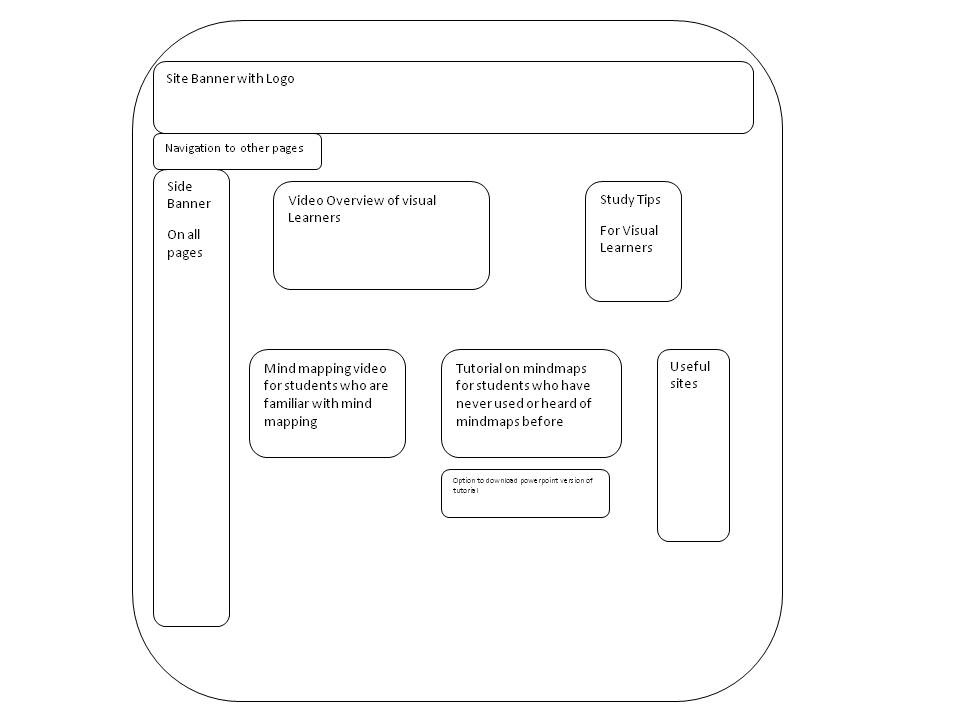
This is the wireframe that I decided to use when planning my web page. It was designed November 2011.
Although as a group we decided to use screenshots of the web pages in our story board to give an idea of colour schemes and layout, I prefer to use the wire frame approach to plan my own page. I have had very strong ideas as to how our website would look whilst we planned it. For other members of the group they found it more difficult to visualise what the concept was until we set up the basic pages of the site. This may have been the reason for the decision to include the detailed colour diagrams in the story board, or perhaps it was felt that the diagrams provided more detail than the wireframe approach. As we have agreed colour and layout I feel that the wireframe provides me as the designer with a clear view of what content needs to be created and where it needs to be placed. The wireframe will be used to indicate work in progress and work completed so that it is evident what needs areas need attention.In keeping with Damien’s advice on the research carried out into how web pages are viewed I have tried to keep material within that F shape that has been shown to be the area that the eye is drawn to.
When considering the design of the content for this page I have been influenced by Clarke and Mayer and their ideas regarding multimedia. They suggest that for the novice learner static images are preferable to video as they allow the learner to control the pace that they take in information and reduce cognitive load. With this in mind I have created video content for the more advanced learner and tried to use static images in content for the novice. The content is freely available so learners can decide which format they prefer. This is in keeping with X and X who suggest that online learners are self directed and design should allow learners to decide for themselves which content they would prefer to view.
In addition my design has been influenced by Merrill who suggests that there are five first principles of instruction. In many of the resources that the authors have evaluated it has been found that some but not all of the principles have applied. There is anecdotal evidence that supports the argument that where first principles are applied training is more effective. I have incorporated these principles when creating the mindmapping content for the learner who has never used mindmapping before. They are applied as follows
Demonstration Principle – Student is shown how to create a mindmap
Application Principle – Student is provided with a quiz in which they are guided in the application of their newly acquired knowledge
Task Centred Principle – the student is presented with the complete task in its simplest format. Where further content is developed the student would be taken through more complex mind maps with each task building on the previous one leading to the scaffolding being completely reduced and the student completed the most complex task on completion of the content
Activation Principle – Learning is enhanced through the structure provided in the module.
Integration Principle – The examples used in the content whilst they are simple are based on academic subjects that allow the student integrate their newly acquired knowledge into their study plans
Learning through the application of these principles is enhanced through collaboration and students are encouraged to provide advice and suggestions for other visual learners through the use of the blog.
With regard to accessibility I have used youtube video where appropriate and the application screenr if possible to ensure that video content is accessible for mobile phone users. Font and text conform to the guidelines laid down by the Dsylexic Association of Ireland. Where flash content has been used a text download is availableBased on the wiremap above the items that need to be completed are Create video overview of learning styleCreate graphic organiser of overviewList study tips for visual learnersLocate you tube video on mindmapping -http://www.youtube.com/watch?v=_3r6ZbE3ci0&feature=relatedCreate content for tutorial on mindmappingCreate pdf of content for downloadCreate a list of useful sites http://freenuts.com/top-10-free-online-mind-mapping-tools/ http://www.mirandanet.ac.ukWhile compiling a suggested script for the video I realised that a video may not be sufficiently visual for what I wanted to discuss. I am now thinking of creating an articulate piece that has lots of visuals and audio
